




When upgrading a PC’s memory, many users focus on RAM capacity and speed but overlook another important factor: memory channel configuration.
You may have seen recommendations to install two RAM sticks instead of one. But does dual-channel memory actually make a noticeable difference? Will it improve gaming performance, application responsiveness, or everyday computing?
The answer depends on how your computer uses memory. Dual-channel memory can significantly increase available memory bandwidth, particularly in bandwidth-sensitive workloads. However, it does not automatically double overall system performance.
In this article, we will explain how single-channel and dual-channel RAM work, compare their bandwidth, examine their impact on real-world performance, and show you how to configure dual-channel memory correctly.
1. What Is Single-Channel and Dual-Channel RAM?
Memory channels are communication pathways between the CPU’s memory controller and system memory. They determine how much data can be transferred between the processor and RAM at the same time.
Single-Channel Memory
In a single-channel configuration, the memory controller uses one 64-bit memory channel to communicate with the installed RAM.
For example, installing one 16GB DDR4 or DDR5 desktop memory module on a typical consumer platform generally provides a single 64-bit channel configuration.
This setup is straightforward and allows the system to operate normally. However, the available memory bandwidth may become a limitation in applications that frequently access large amounts of data.
Dual-Channel Memory
In a dual-channel configuration, the memory controller uses two independent 64-bit memory channels simultaneously.
For example, installing two compatible 8GB memory modules in the recommended motherboard slots can enable dual-channel operation, providing a combined capacity of 16GB.
Because both channels can transfer data simultaneously, dual-channel memory offers greater theoretical bandwidth than a comparable single-channel configuration.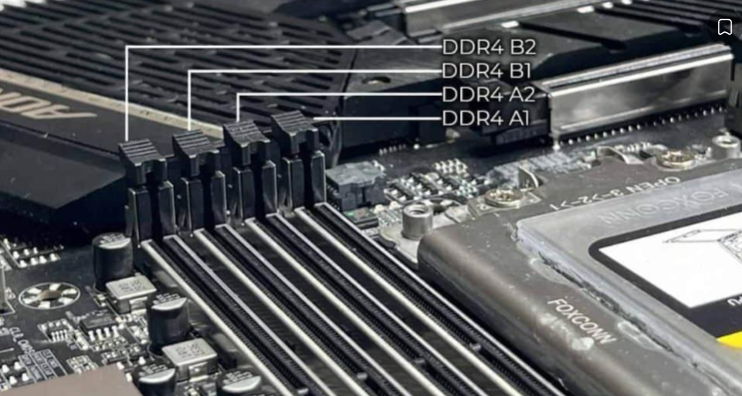
The key difference is not simply the number of memory sticks. It is the number of active memory channels supported and enabled by the CPU and motherboard.
2. Single-Channel vs. Dual-Channel: What Is the Bandwidth Difference?
Memory bandwidth refers to the amount of data RAM can transfer per second. It is commonly measured in GB/s.
For a typical 64-bit DDR memory channel, theoretical bandwidth can be calculated using:
Using DDR5-6000 as an example:
| Configuration | Theoretical Bandwidth |
|---|---|
| Single 64-bit channel | 48 GB/s |
| Dual 64-bit channels | 96 GB/s |
The figures are theoretical maximums based on the stated data rate and channel width. Actual application performance depends on platform design, memory timings, workload, and system configuration.
This means dual-channel memory can theoretically provide twice the aggregate bandwidth of a single 64-bit channel operating at the same data rate.
An important DDR5 distinction: Standard desktop DDR5 memory modules are internally divided into two independent 32-bit subchannels. However, one DDR5 DIMM installed on a typical desktop platform does not provide the same aggregate 128-bit bandwidth as two DIMMs operating across the CPU’s two memory channels. Therefore, DDR5’s internal subchannels should not be confused with motherboard-level dual-channel operation.
3. Does Dual-Channel RAM Improve Gaming Performance?
Gaming is one of the most common reasons users consider dual-channel memory.
The actual performance difference depends on the game, graphics hardware, resolution, and memory requirements.
With Integrated Graphics
Integrated graphics processors use system memory rather than dedicated video memory. This makes memory bandwidth particularly important.
A single-channel configuration can restrict the amount of data available to the integrated GPU, potentially reducing frame rates and causing less consistent performance.
Dual-channel memory can provide more bandwidth for graphics processing, making it especially beneficial for systems using integrated graphics.

With a Dedicated Graphics Card
Dedicated graphics cards have their own video memory, so they generally rely less on system RAM for graphics workloads.
As a result, the difference between single-channel and dual-channel memory may be smaller than on integrated graphics systems.
However, dual-channel memory can still improve performance in certain CPU-intensive games, particularly when the system is limited by memory bandwidth.
Gaming Performance Depends on More Than Memory Channels
Other factors also influence gaming performance, including:
-
GPU performance and video memory capacity.
-
CPU processing power.
-
RAM capacity and data rate.
-
Game optimization and graphics settings.
-
Resolution and target frame rate.
Dual-channel memory is a useful way to improve memory bandwidth, but it should not be expected to produce the same performance improvement in every game.
4. Does Dual-Channel RAM Make a Difference in Everyday Computing?
For everyday tasks such as web browsing, office applications, video playback, and general multitasking, the difference between single-channel and dual-channel memory may be less noticeable.
Many everyday applications do not continuously use the maximum available memory bandwidth. Their performance may depend more on CPU speed, storage responsiveness, and available RAM capacity.
However, dual-channel memory can still be beneficial in workloads involving frequent memory transfers.
Examples include:
-
Multitasking: Running several applications simultaneously.
-
Content Creation: Working with image editing and video production software.
-
Large Data Processing: Handling larger datasets and memory-intensive operations.
-
Integrated Graphics Workloads: Running graphics applications without a dedicated GPU.
It is also important to distinguish memory capacity from memory bandwidth.
For example, a 16GB single-channel configuration may have sufficient capacity for a particular workload but lower bandwidth than a comparable 16GB dual-channel configuration.
Adding more RAM does not automatically increase memory bandwidth unless the additional module enables a wider channel configuration.
5. How to Enable Dual-Channel Memory on Your Motherboard
Installing two RAM modules does not always guarantee dual-channel operation. The modules must be installed in the appropriate motherboard slots, and the platform must support the configuration.
On many consumer desktop motherboards with four DIMM slots, the recommended configuration for two memory modules is A2 and B2.
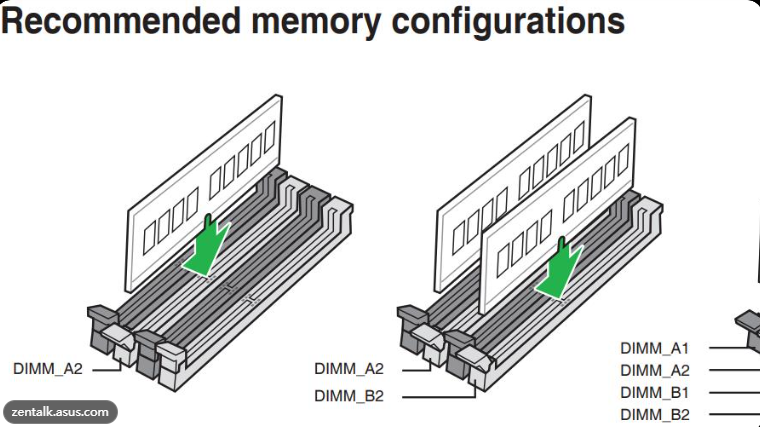
Follow these steps:
Step 1: Check Your Motherboard Manual
Identify the recommended memory slots for a two-module configuration. Many motherboards recommend A2 and B2, but the exact arrangement varies.
Step 2: Install Compatible RAM Modules
For the best chance of stable operation, use modules with matching capacity, data rate, and timings. A matched memory kit is generally recommended.
Step 3: Check BIOS Settings
After installation, enter the BIOS or UEFI interface and verify that the system recognizes both memory modules. If supported, enable the appropriate memory profile, such as XMP or EXPO, to use the advertised memory settings.
Step 4: Verify Memory Channel Configuration
You can use system information tools or CPU-Z to check whether the memory is operating in the expected channel configuration. The exact reporting terminology may vary depending on the memory generation and platform.
If the system still operates in single-channel mode, check the motherboard slot arrangement, CPU and motherboard compatibility, and memory installation.
6. Should You Choose One RAM Stick or Two?
The right configuration depends on your current system requirements, upgrade plans, and budget.
| Configuration | Advantages | Considerations |
|---|---|---|
| 1 × 16GB | Simple installation; leaves more slots available | Lower aggregate memory bandwidth on a typical dual-channel desktop platform |
| 2 × 8GB | Enables dual-channel operation; suitable for many basic systems | Uses two memory slots; 16GB total capacity |
| 2 × 16GB | 32GB capacity with dual-channel operation | Higher initial cost than a single module |
| 2 × 32GB | Larger capacity for demanding workloads | Requires platform support and a higher budget |
For most users building a new desktop PC, a two-module configuration is a practical choice when the required capacity and budget allow it.
For example, a 32GB kit consisting of two 16GB DDR5 modules can provide both sufficient capacity for many modern applications and dual-channel operation on a typical dual-channel desktop platform.
However, if you plan to upgrade memory capacity later, a single larger module may offer more flexibility. You should consider the trade-off between immediate bandwidth and future expansion.
7. Final Thoughts: Is Dual-Channel RAM Worth It?
Yes, dual-channel RAM is generally worth considering, especially when building a new PC or upgrading a system that relies on integrated graphics.
By using two memory channels simultaneously, dual-channel configurations can significantly increase theoretical memory bandwidth compared with a single 64-bit channel at the same data rate.
The benefits are most noticeable in memory-bandwidth-sensitive workloads, including integrated graphics and certain gaming or content creation applications. For everyday computing, the difference may be less obvious.
When choosing RAM, remember to consider three important factors:
-
Capacity: Make sure you have enough memory for your applications.
-
Speed: Choose a data rate supported by your CPU and motherboard.
-
Channel Configuration: Use a suitable multi-module configuration to take advantage of available memory channels.
A balanced memory configuration helps your system make better use of its available hardware resources.
At Oreton, we offer DDR4 and DDR5 memory solutions in different capacities and configurations for desktop computing and gaming applications. Whether you are upgrading an existing PC or planning a new system, choosing the right memory configuration is an important step toward building a balanced and reliable computer.
Explore Oreton Memory Solutions and contact our team for product specifications and business inquiries.