





Understanding SSD Health Data, Wear Indicators, Error Records and Temperature Monitoring
An SSD can continue to operate normally while its internal health indicators change over time. Conversely, a drive may experience unexpected problems even when its reported health status appears acceptable. Understanding Self-Monitoring, Analysis and Reporting Technology (SMART) data helps users evaluate storage conditions, identify potential warning signs, and make more informed maintenance decisions.
However, SMART is not a universal pass-or-fail test. Different SSD controllers, firmware implementations, and monitoring tools may report different attributes or interpret them differently. To assess drive health accurately, it is important to understand what each indicator measures, what it can reveal, and where its limitations lie.
1. What Is SSD SMART?
SMART is a monitoring and reporting system that allows a storage device to expose information about its operating history, usage, error conditions, and, where supported, estimated health.
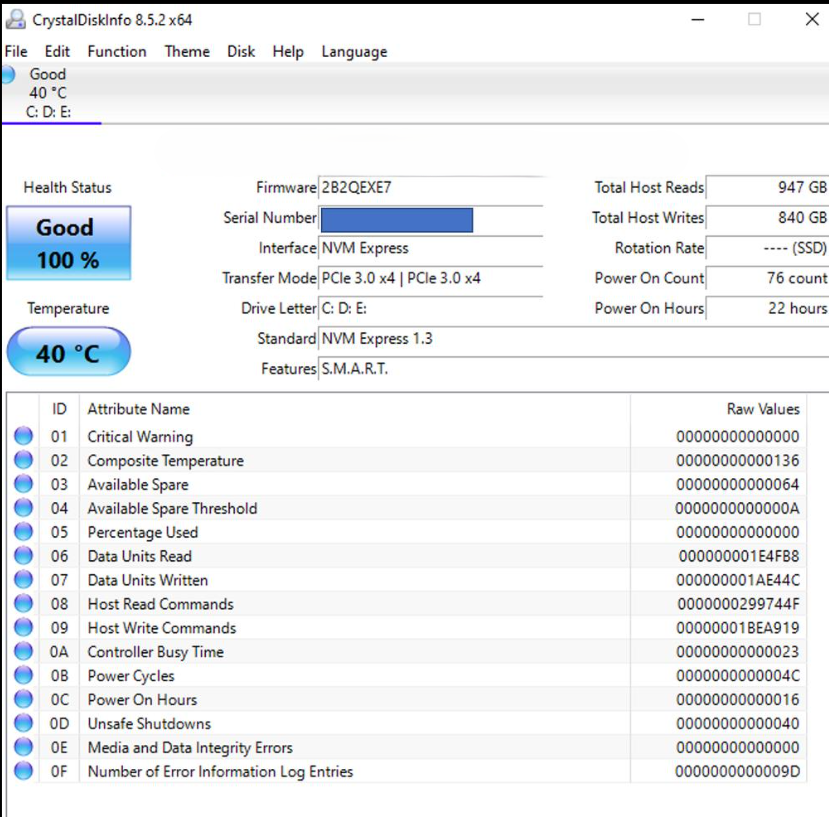
For SSDs, SMART data may include:
- Power-on hours and power-cycle counts
- Total host reads and writes
- NAND wear indicators and estimated remaining life
- Temperature readings
- Media and data integrity errors
- Error logs and interface-related issues
- Available spare capacity and threshold warnings
The exact attributes depend on the drive and its firmware. SATA SSDs commonly expose SMART attributes through ATA commands, while NVMe SSDs provide standardized health information through their SMART / Health Information log. Some underlying measurements are comparable, but their definitions and reporting formats are not always identical.
SMART data is most useful when interpreted as a collection of indicators over time rather than as a single health percentage.
2. Power-On Hours and Power-Cycle Count
Power-on hours indicate how long a drive has been powered on, while the power-cycle count records how many times it has been powered up. These values provide context for understanding the drive’s operating history.
A drive with a high number of power-on hours is not necessarily unhealthy. SSDs are designed to operate over extended periods, and total powered-on time alone does not establish how much NAND wear has occurred.
Likewise, frequent power cycles do not automatically indicate a fault. They may simply reflect normal usage patterns, such as a desktop computer being switched on and off daily.
These indicators become more useful when considered alongside workload, write volume, temperature history, and error records. For example, a drive with relatively low power-on hours but substantial host writes may have experienced a much heavier workload than its operating time suggests.
What to look for: Unexpected changes, unusual operating history, or values that do not match the device’s known usage. Neither power-on hours nor power-cycle count should be used alone to determine remaining SSD lifespan.
3. Total Host Writes and NAND Wear
Total host writes measure the amount of data written to the drive by the host system. This is one of the most useful indicators for understanding SSD workload and endurance consumption.
However, host writes and NAND writes are not the same measurement. The SSD controller may write additional data internally during garbage collection, data relocation, and other flash-management operations. The relationship between host writes and NAND writes is commonly described using write amplification.
For example, a workload involving frequent small random writes may generate more internal NAND activity than a workload consisting mainly of large sequential writes, even when the host reports a similar amount of data written.
To understand endurance, it is useful to distinguish three concepts:
- Host writes: Data written by the operating system or applications to the SSD.
- NAND writes: Data actually programmed into NAND flash, including internal controller activity where measurable.
- Rated endurance: The manufacturer’s specified endurance rating, often expressed as total bytes written (TBW) or another defined endurance measure.
A drive approaching its rated host-write endurance is not necessarily about to fail. Endurance ratings are defined under particular test conditions and do not predict the exact failure time of an individual drive.
For NVMe SSDs, the SMART / Health Information log includes a Data Units Written counter. Its reported value represents host data units written, not a direct measurement of physical NAND writes. Other attributes, such as Percentage Used, provide additional endurance-related information.
What to look for: Compare cumulative host writes with the drive’s specified endurance rating, review the workload, and observe how wear-related indicators change over time.
4. Percentage Used and Available Spare
NVMe SSDs provide two especially useful health fields: Percentage Used 그리고 Available Spare.
Percentage Used
Percentage Used is an estimate of the percentage of the drive’s rated endurance that has been consumed. A reported value of 20% generally indicates that approximately one-fifth of the rated endurance has been used according to the drive’s estimation method.
A value of 100% means the estimated rated endurance has been consumed. It does not necessarily mean that the drive has failed or can no longer store data. The device may continue to operate beyond this point, although its remaining endurance should be evaluated carefully.
Values above 100% may also be reported, depending on the device and specification implementation.
Available Spare
Available Spare represents the remaining spare capacity available to the controller, expressed as a percentage. Spare blocks help the SSD manage unusable or worn-out flash blocks and maintain normal operation.
NVMe also defines an Available Spare Threshold. If the available spare value falls below the specified threshold, the drive can report a health warning.
These fields are not interchangeable. Percentage Used estimates endurance consumption, while Available Spare reflects a different aspect of the drive’s operational reserve.
What to look for: Review both fields, check the manufacturer’s specifications, and pay attention to threshold warnings instead of relying on a generic health score alone.
5. Temperature: An Important Operating Indicator
SSD temperature affects operating conditions and can influence sustained performance. Under heavy workloads, particularly during long transfers or sustained random I/O, an SSD may become warm enough to activate thermal management or throttling.
SMART temperature readings help users determine whether the drive is operating within its specified range. Depending on the device, a monitoring tool may display a composite temperature, a controller temperature, or additional sensor readings.
A brief temperature increase during a demanding workload is not automatically a problem. More important factors include how long the drive remains hot, whether the temperature exceeds the manufacturer’s operating limits, and whether performance changes at the same time.
Temperature limits vary by model. There is no single universal threshold that applies to every SATA or NVMe SSD.
What to look for: Compare readings with the specific drive’s operating-temperature specifications. If high temperatures coincide with declining sustained performance, investigate airflow, heatsink installation, thermal-pad contact, and the surrounding system environment.
6. Media Errors and Data Integrity Errors
Error-related SMART indicators can provide important evidence about storage reliability, but their meaning depends on the interface and attribute definition.
NVMe SSDs expose fields including Media and Data Integrity Errors 그리고 Error Information Log Entries.
Media and Data Integrity Errors count detected errors associated with unrecovered data integrity problems or media-related issues, as defined by the NVMe specification. A nonzero value deserves investigation, especially if it continues to increase.
Error Information Log Entries counts entries recorded in the NVMe error information log. This is not equivalent to a count of unrecoverable media failures. Some entries may relate to commands, invalid parameters, or other conditions, so the underlying log details matter.
SATA SMART attributes may expose different counters, such as reported uncorrectable errors, reallocated sectors, or other vendor-defined records. Their exact meanings should be confirmed against the drive documentation.
A single historical error does not always indicate an ongoing fault. The key questions are whether the error is persistent, whether the counter is increasing, and whether the system also reports I/O errors, corrupted data, or unexpected disconnections.
What to look for: Investigate repeated or increasing media and integrity errors, review available error logs, and back up important data if reliability is in doubt.
7. Unsafe Shutdowns and Interface Errors
Some SMART reports include unsafe shutdown counts, command timeouts, CRC errors, or other interface-related indicators. These can help distinguish potential storage-media problems from issues involving power delivery, cabling, connections, or the host system.
For NVMe drives, Unsafe Shutdowns records occasions when the controller detects that power was removed without a shutdown notification. A high count may reflect power outages, forced shutdowns, system crashes, or other interruptions. It does not, by itself, prove that the SSD is damaged.
For SATA drives, CRC-related errors may point toward data-transfer problems along the interface path. Depending on the system, checking the SATA cable, connector, and port may be more relevant than replacing the SSD immediately.
Interpret these records alongside system logs and the circumstances in which the errors occurred.
What to look for: Repeated unexpected shutdowns, increasing interface errors, or storage disconnects that coincide with system instability.
8. How to Read SMART Data Correctly
A reliable assessment starts with the correct tool and the correct attribute definitions.
Step 1: Identify the Drive and Interface
Confirm the SSD model, firmware version, and whether it uses SATA or NVMe. This determines which health fields are available and how they should be interpreted.
Step 2: Use a Compatible Monitoring Tool
Use a reputable monitoring utility that supports the drive and its interface. Tools may display raw values, normalized values, estimated health percentages, or simplified warnings.
A simplified health score is useful for quick reference, but it may hide differences between wear, error history, and temperature. For NVMe drives, checking the underlying SMART / Health Information log can provide more context.
Step 3: Check Multiple Indicators
Avoid making a judgment based on one field. Review endurance consumption, available spare capacity where applicable, temperature, media errors, and other relevant records together.
Step 4: Track Changes Over Time
A snapshot shows the current reported state; a trend can reveal whether the situation is stable or deteriorating. Record readings periodically and compare them under similar workloads when possible.
Step 5: Back Up Data When Warning Signs Appear
SMART monitoring cannot guarantee that a drive will not fail. If the system experiences repeated I/O errors, unexpected disconnections, or suspected data corruption, back up important files before performing lengthy diagnostics or stress tests.
9. Why SMART Cannot Predict Every SSD Failure
SMART provides valuable evidence, but it has important limitations.
First, attributes vary across manufacturers and product families. Even when two drives display similar health percentages, their estimation methods may differ.
Second, some failures develop suddenly or occur in components that are not fully represented by the reported health fields. Controller faults, power problems, firmware issues, and unexpected electrical events may not be predicted by a gradual change in SMART data.
Third, a healthy-looking report does not guarantee data integrity. Important files should still be backed up, and systems that require high availability should use an appropriate data-protection strategy.
For these reasons, SMART should be treated as one part of a broader reliability process that includes monitoring, error-log review, workload assessment, backups, and appropriate validation testing.
결론
SSD SMART attributes help users understand operating history, write workload, endurance consumption, temperature, and reported error conditions. The most meaningful indicators depend on the drive interface and firmware, so accurate interpretation requires more than checking a single health percentage.
For everyday users, the practical approach is to monitor several indicators, investigate abnormal or increasing error counts, follow model-specific temperature and endurance guidance, and maintain regular backups.
For system builders and storage solution providers, consistent SMART interpretation can also support product validation, field troubleshooting, and long-term reliability monitoring. Ultimately, SMART data is most valuable when it is understood in context and used to guide action—not treated as a guarantee of future drive behavior.