





Understanding how SSD size influences compatibility, thermal performance, upgradeability, and hardware design across modern computing platforms.
When people compare SSDs, the conversation usually revolves around capacity, interface, or read and write speeds. Specifications such as PCIe Gen4, NVMe, or 7,000 MB/s often receive the most attention because they are easy to compare.
However, for PC manufacturers, OEM partners, system integrators, and even experienced PC builders, another factor is just as important—the SSD form factor.
Choosing the correct form factor is not simply about whether an SSD physically fits inside a device. It influences motherboard layout, thermal design, battery capacity, upgradeability, manufacturing costs, and even the type of customers a product is designed to serve.
A compact handheld gaming device cannot accommodate the same storage solution as a desktop workstation. Likewise, an industrial computer designed for years of continuous operation may prioritize reliability and serviceability over minimizing physical size.
As computers continue to become thinner, lighter, and more specialized, SSD form factors have evolved to support these different design goals.
Understanding these options helps businesses make better purchasing decisions while allowing OEM manufacturers to design products that balance performance, reliability, and cost.
SSD Form Factor vs Interface: Understanding the Difference
Before comparing different SSD sizes, it is important to clarify one common misconception.
Many users assume that the physical size of an SSD determines its performance.
En realidad, form factor and interface are two different concepts.
En formato describes the physical dimensions of the SSD—its length, width, and overall shape.
En interfaz determines how the SSD communicates with the system.
Por ejemplo:
- A 2.5-inch SSD almost always uses the SATA interface.
- An M.2 SSD may use either SATA or NVMe (PCIe), depending on the specific model and motherboard.
- Two M.2 SSDs that look nearly identical may deliver very different levels of performance because they use different interfaces.
This distinction is particularly important during system design. An M.2 slot does not automatically guarantee NVMe support, and selecting the wrong interface can lead to compatibility issues despite the SSD fitting perfectly into the connector.
For OEM projects, understanding both the physical form factor and the electrical interface is essential to avoid costly redesigns or deployment problems.
Why Are There So Many SSD Sizes?
Unlike desktop computers of the past, today’s computing devices cover an enormous range of applications.
Modern hardware includes:
- Business desktops
- Commercial laptops
- Mini PCs
- Industrial computers
- Embedded systems
- Gaming handhelds
- AI workstations
- Edge computing devices
Each platform has different design priorities.
Some emphasize maximum storage capacity.
Others prioritize compact dimensions.
Some require passive cooling.
Others need easy maintenance.
Instead of creating one universal SSD, manufacturers developed multiple form factors that allow storage solutions to adapt to different system requirements.
Selecting the appropriate size therefore becomes part of the overall product design process rather than simply choosing whichever SSD is available.
The 2.5-Inch SATA SSD: Proven Compatibility for Commercial Systems
Although M.2 SSDs dominate discussions about modern storage, the 2.5-inch SATA SSD remains one of the most widely deployed storage solutions in commercial computing.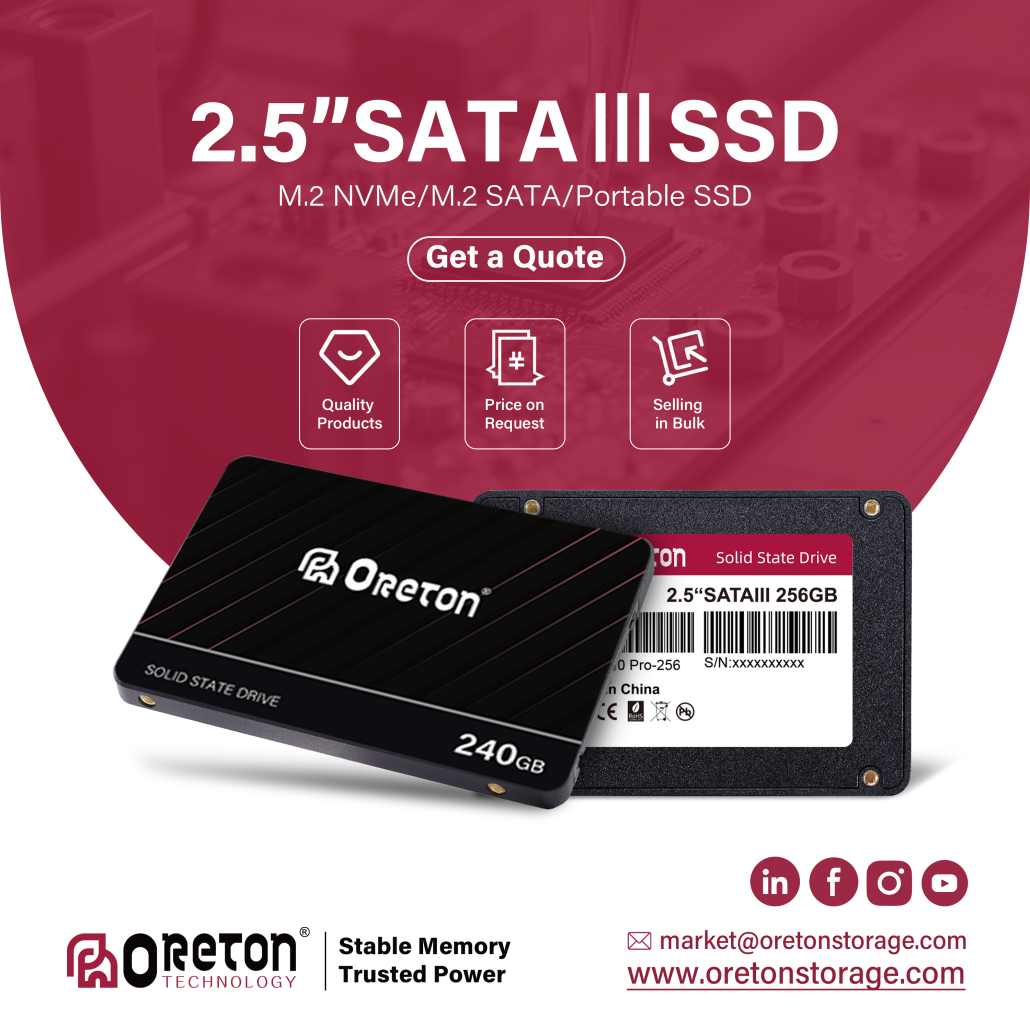
Its continued popularity is not due to outdated technology but rather to its practical advantages.
For businesses, compatibility often matters more than adopting the newest standards.
Millions of office computers, POS terminals, industrial systems, and commercial desktops continue to rely on SATA storage because the surrounding hardware was originally designed for this interface.
Replacing an aging hard drive with a 2.5-inch SATA SSD can dramatically improve boot times and application responsiveness without requiring major hardware changes.
This makes SATA SSDs an attractive choice for organizations upgrading existing systems while controlling deployment costs.
Typical applications include:
- Office desktops
- Commercial PCs
- Retail POS systems
- Educational computers
- Industrial control systems
- Legacy workstation upgrades
Another advantage is serviceability.
Technicians can replace a 2.5-inch SSD quickly using standard SATA cables, making maintenance straightforward in large-scale deployments.
Even as newer technologies continue to evolve, SATA SSDs remain highly relevant in many global markets where mature hardware platforms continue to dominate business environments.
M.2 2280: The Industry Standard for Modern PCs
Among all M.2 form factors, 2280 has become the industry standard.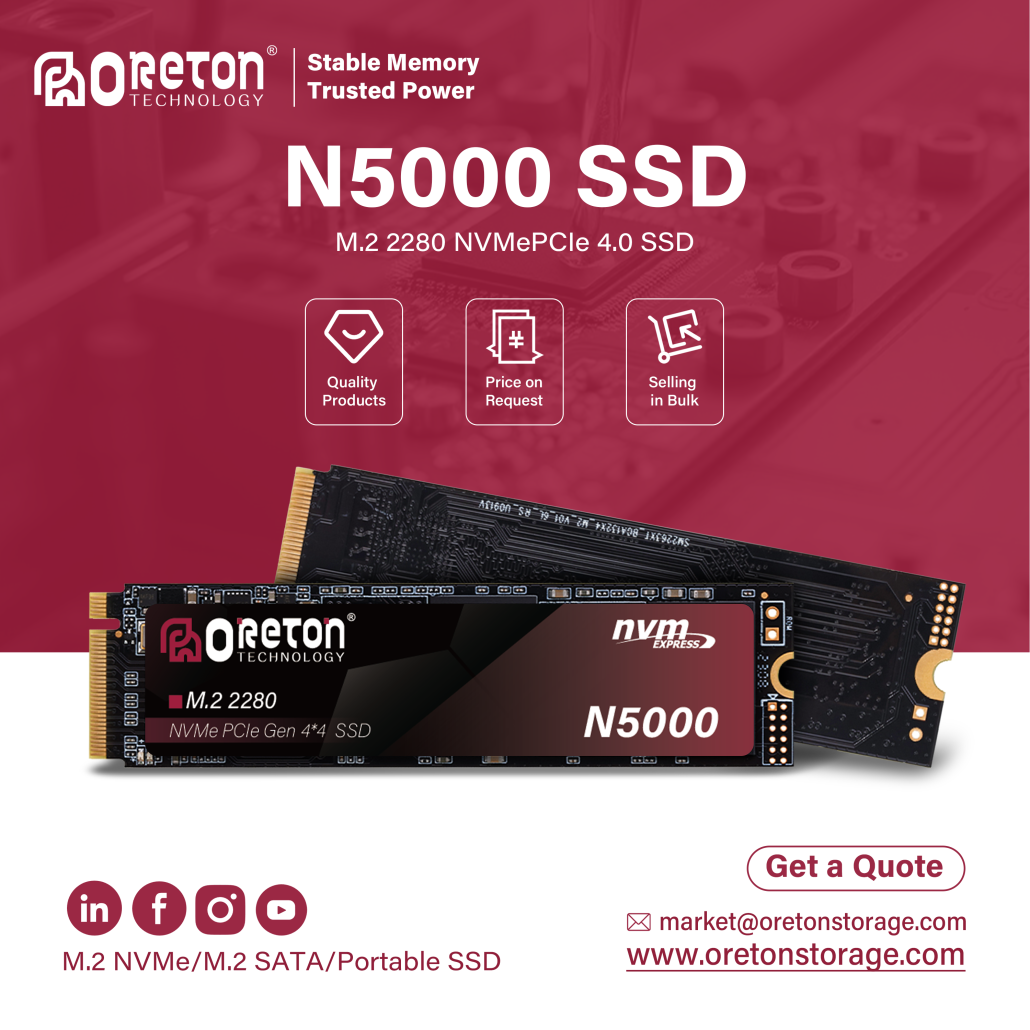
The designation is straightforward:
- 22 mm wide
- 80 mm long
This size offers an excellent balance between available PCB space, thermal performance, storage capacity, and manufacturing flexibility.
Because the PCB is relatively long, manufacturers have more room to place NAND flash packages, controllers, power management components, and other circuitry.
The larger surface area also helps distribute heat more effectively during sustained workloads.
As a result, M.2 2280 supports some of today’s highest-capacity and highest-performance consumer and commercial SSDs.
It has become the preferred choice for:
- Desktop PCs
- Gaming systems
- Professional workstations
- High-performance laptops
- AI development computers
- Business notebooks
Most PCIe Gen4 and PCIe Gen5 SSDs available today use the 2280 form factor.
For OEM designers, it represents a mature ecosystem with broad motherboard support and abundant component availability.
Unless physical space becomes a limitation, 2280 is often the easiest form factor to integrate into new systems.
M.2 2242: Balancing Performance and Space
As computers become more compact, not every device can accommodate an 80 mm SSD.
This led to the adoption of M.2 2242, measuring:
- 22 mm wide
- 42 mm long
While considerably shorter than 2280, it still provides enough PCB space for modern SSD controllers and several NAND packages.
Because of its reduced length, 2242 is frequently found in devices where motherboard space is limited but storage performance remains important.
Algunos ejemplos son:
- Mini PCs
- Compact industrial computers
- Embedded systems
- Thin clients
- Networking equipment
- Certain business laptops
For many OEM projects, 2242 represents an effective compromise between physical size and storage capability.
Compared with 2230, it offers slightly more room for components and often better thermal characteristics, while requiring significantly less space than a full-length 2280 SSD.
As compact computing continues to expand across commercial applications, demand for 2242 solutions is expected to remain steady.
M.2 2230: Small Size, Growing Importance
The smallest mainstream M.2 SSD form factor is 2230.
Its dimensions are:
- 22 mm wide
- 30 mm long
Although only five centimeters smaller than 2280, the design challenges are significantly greater.
Every millimeter of PCB space becomes valuable.
Engineers must carefully position the controller, NAND packages, and power management circuitry within a much smaller footprint.
Despite these limitations, 2230 SSDs have become increasingly important as manufacturers continue developing ultra-compact devices.
Typical applications include:
- Gaming handhelds
- Ultra-thin tablets
- Compact laptops
- Portable AI devices
- Embedded computing platforms
Products such as the Steam Deck, ASUS ROG Ally, and Microsoft Surface series have helped increase awareness of the 2230 form factor.
At the same time, NAND flash density has improved dramatically, allowing manufacturers to offer capacities that were once unimaginable for such a compact PCB.
While early 2230 SSDs were often limited to relatively small capacities, modern models are now available in capacities up to 2TB, making them suitable for increasingly demanding applications.
However, achieving high performance within such a compact design requires careful engineering, particularly regarding thermal management and power efficiency.
How SSD Form Factors Influence Thermal Design
One of the biggest differences between SSD form factors is something users rarely see: heat management.
As SSD performance has increased over the years, controllers have become more powerful and NAND flash has become denser. These improvements also generate more heat, especially during sustained workloads such as large file transfers, video editing, software compilation, or AI model loading.
The physical size of an SSD directly affects how efficiently this heat can be dissipated.
A longer PCB provides more surface area for heat to spread across the drive. It also gives manufacturers greater flexibility when arranging the controller, NAND packages, power management components, and thermal pads.
This is one reason why M.2 2280 has become the preferred choice for high-performance PCIe Gen4 and PCIe Gen5 SSDs.
By comparison, M.2 2230 SSDs concentrate similar components into a much smaller area. Although modern controllers have become more power efficient, thermal management remains more challenging in compact designs.
Of course, this does not mean that 2230 SSDs are unreliable or unsuitable for demanding applications. Instead, it means system designers must carefully balance performance, power consumption, and cooling within a much tighter physical space.
For OEM engineers, thermal performance is evaluated as part of the complete system rather than the SSD alone. Airflow, chassis materials, motherboard layout, and surrounding components all influence operating temperatures.
Capacity Is Not Just About NAND Density
Many people assume that a smaller SSD automatically means lower capacity.
While this was often true several years ago, advances in NAND flash technology have significantly changed the situation.
Today, storage capacity depends on several factors, including:
- NAND density
- Number of NAND packages
- Controller capabilities
- PCB space
- Thermal considerations
Because M.2 2280 offers the largest PCB among the common consumer form factors, it continues to support the widest range of capacities, from entry-level drives to high-capacity professional models.
M.2 2242 and 2230 SSDs are also becoming available in larger capacities as flash technology evolves. However, their more compact layouts generally offer fewer configuration options and may involve higher manufacturing costs for equivalent capacities.
For OEM projects, capacity planning should always reflect the intended workload rather than selecting the highest available specification.
A retail POS terminal, for example, rarely requires the same storage capacity as an AI workstation or video editing system.
Power Consumption Matters in Portable Devices
As notebooks, tablets, handheld gaming devices, and edge computing systems become more compact, power efficiency has become an increasingly important design consideration.
Although SSDs consume relatively little power compared with processors or graphics cards, storage still contributes to overall battery life and thermal output.
This is particularly important for devices that operate without active cooling.
Compact form factors such as 2230 are commonly selected not only because they save space but also because they support highly integrated, low-power system designs.
On the other hand, desktop workstations and industrial computers typically have fewer power constraints, allowing designers to prioritize sustained performance and higher storage capacities.
The optimal SSD therefore depends on the balance between mobility, performance, and energy efficiency.
Different Devices, Different Design Priorities
One of the easiest ways to understand SSD form factors is to look at how different types of computers are designed.
Office Desktop PCs
Traditional office desktops usually provide generous internal space.
Many still support both 2.5-inch SATA SSDs y M.2 2280 NVMe SSDs, giving businesses flexibility when upgrading or deploying new systems.
For commercial environments, compatibility and ease of maintenance often outweigh the need for the smallest possible hardware.
Business Laptops
Modern laptops generally standardize on M.2 2280 because it offers an excellent balance of performance, storage capacity, and serviceability.
Some thinner notebooks may adopt 2242 SSDs to free additional motherboard space for larger batteries or improved cooling systems.
Mini PCs
Mini PCs have become increasingly popular for offices, education, digital signage, and embedded applications.
Their compact dimensions require careful use of internal space.
Depending on the chassis design, manufacturers may choose:
- M.2 2280
- M.2 2242
- Occasionally 2.5-inch SATA SSDs
The choice depends on cooling, motherboard layout, and product positioning.
Industrial Computers
Industrial systems often prioritize reliability over compactness.
Many continue to use 2.5-inch SATA SSDs because they are easy to replace, widely compatible, and well suited to long product life cycles.
Where space is limited, 2242 o 2280 SSDs are increasingly common in embedded industrial platforms.
Gaming Handhelds and Ultra-Compact Devices
Products such as handheld gaming consoles and certain tablets frequently rely on 2230 SSDs.
In these devices, every millimeter of available space is carefully allocated.
Using a shorter SSD allows manufacturers to optimize cooling, battery capacity, and overall product dimensions without sacrificing modern NVMe performance.
Choosing the Right Form Factor for OEM Projects
For OEM customers, selecting an SSD form factor is rarely a standalone decision.
Instead, it is part of the overall product development process.
Engineers typically evaluate factors such as:
- Motherboard layout
- Chassis dimensions
- Cooling design
- Target market
- Manufacturing costs
- Product lifecycle
- Upgradeability
- Supply chain stability
For example, a commercial desktop designed for five years of enterprise deployment may prioritize easy servicing and broad compatibility.
A premium ultrabook may instead focus on maximizing battery size and minimizing thickness.
An industrial controller may require long-term component availability and consistent hardware validation.
In each case, the “best” SSD is the one that supports the overall system objectives—not necessarily the smallest or fastest option available.
Common Misconceptions About SSD Form Factors
As SSDs become more diverse, several misconceptions continue to appear.
Myth 1: A Larger SSD Is Always Faster
Physical size does not determine performance.
A PCIe Gen4 2230 SSD can easily outperform an older SATA 2.5-inch SSD despite being much smaller.
Performance depends on the controller, interface, firmware, NAND flash, and platform support—not simply the dimensions of the drive.
Myth 2: All M.2 SSDs Are NVMe
Many users assume every M.2 SSD uses PCIe.
In reality, some M.2 SSDs still use the SATA interface.
Before selecting a drive, users should always verify what interfaces the motherboard supports.
Myth 3: Smaller SSDs Are Less Reliable
Reliability is determined primarily by component quality, controller design, firmware validation, NAND flash, and manufacturing standards.
A well-designed 2230 SSD can provide excellent reliability when used within its intended operating environment.
Myth 4: Newer Form Factors Replace Older Ones
The emergence of smaller M.2 SSDs does not mean 2.5-inch SATA SSDs are disappearing.
Across many commercial and industrial markets, SATA SSDs remain an excellent solution due to their mature ecosystem, compatibility, and cost efficiency.
Different form factors continue to coexist because they solve different engineering challenges.
Future Trends in SSD Form Factors
Looking ahead, SSD form factors will continue evolving alongside computer design.
Ultra-thin notebooks, handheld gaming devices, AI edge computing systems, and embedded platforms are expected to drive continued demand for compact formats such as 2230 y 2242.
At the same time, 2280 is likely to remain the dominant standard for mainstream desktops, laptops, workstations, and high-performance consumer systems due to its balance of capacity, thermal performance, and compatibility.
Meanwhile, 2.5-inch SATA SSDs are expected to remain important in commercial upgrades, enterprise deployments, industrial systems, and markets where mature hardware platforms continue to represent a large installed base.
Rather than replacing one another, these form factors will continue serving different segments of the computing industry.
Conclusión
Choosing an SSD form factor is about far more than selecting a drive that physically fits inside a device.
Each form factor represents a different balance of space, performance, thermal design, upgradeability, manufacturing cost, and long-term product strategy.
From the proven compatibility of 2.5-inch SATA SSDs to the versatility of M.2 2280, the compact flexibility of 2242, and the growing importance of 2230 in portable devices, every option has a role in today’s computing ecosystem.
For OEM manufacturers, distributors, and system integrators, understanding these differences helps ensure that storage solutions align with both technical requirements and customer expectations.
En Oreton, we work closely with partners across different markets to provide SSD solutions that match a wide range of system designs and business needs. Whether supporting commercial desktops, industrial platforms, compact Mini PCs, or next-generation portable devices, our focus is on delivering reliable storage products that combine compatibility, consistent performance, and long-term value.