



Understanding SSD Health, Temperature, Error Records, and Drive Lifespan
1. What Is S.M.A.R.T. Monitoring?
S.M.A.R.T. stands for Self-Monitoring, Analysis, and Reporting Technology. It is a monitoring system built into many modern storage devices, including SSDs and HDDs.
Its main purpose is to track the operating condition of a drive and report information that may indicate potential problems.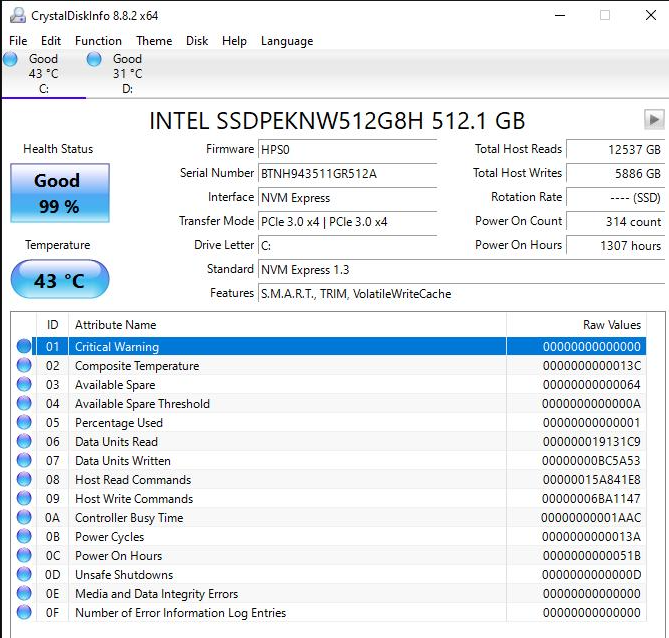
For SSDs, S.M.A.R.T. monitoring collects information about different aspects of drive operation, such as:
- Drive health and remaining endurance
- Operating temperature
- Data written and read
- NAND flash wear
- Unexpected power losses
- Media and data integrity errors
This information helps users and system administrators understand how an SSD is performing and identify warning signs before a drive experiences serious problems.
However, S.M.A.R.T. is a monitoring and reporting mechanism, not a guarantee that a drive will never fail.
2. What Information Does SSD S.M.A.R.T. Monitor?
Different SSD manufacturers and controllers may report different S.M.A.R.T. attributes. The available information also depends on the drive interface, firmware, and monitoring software.
Some commonly monitored attributes include:
SSD Health and Percentage Used
Many SSDs report a health indicator or a percentage-used value.
For NVMe SSDs, the SMART / Health Information Log includes a field called Percentage Used. It estimates how much of the drive’s rated endurance has been consumed.
Zum Beispiel:
- 0% Used: No estimated endurance consumed according to this indicator.
- 50% Used: Approximately half of the rated endurance has been consumed.
- 100% Used: The estimated rated endurance has been consumed.
A value reaching 100% does not automatically mean the SSD will stop working. It indicates that the estimated endurance has been consumed, and the drive may still operate beyond this point.
Some SATA SSDs use a vendor-specific health percentage or remaining-life indicator. The exact interpretation depends on the manufacturer.
Drive Temperature
Temperature is another important parameter.
SSDs generate heat during operation, especially when handling sustained data transfers or demanding workloads.
S.M.A.R.T. monitoring may report:
- Current drive temperature
- Warning temperature thresholds
- Critical temperature thresholds
- Temperature-related operating history, where supported
If an SSD operates at excessively high temperatures, it may activate thermal throttling to reduce heat generation.
This can lower transfer speeds and affect sustained performance.
Monitoring temperature helps users identify cooling problems, insufficient airflow, or workloads that cause excessive heat.
Data Written and Read
S.M.A.R.T. can also report how much data has been written to or read from an SSD.
For NVMe drives, commonly available information includes:
- Data Units Written
- Data Units Read
- Host Write Commands
- Host Read Commands
These values help users understand the drive’s workload and usage patterns.
Data written is particularly useful when evaluating SSD endurance.
For example, if an SSD has a rated endurance of 600 TBW and has recorded 300 TB of host writes, approximately half of its rated write endurance has been used.
This is a simplified comparison. Actual endurance depends on the drive’s specifications, workload, NAND characteristics, and write amplification.
Media and Data Integrity Errors
S.M.A.R.T. can report errors associated with the drive’s storage media and data integrity.
For NVMe SSDs, the Media and Data Integrity Errors field records detected errors that the controller could not successfully recover from.
Other error-related information may include:
- Error Information Log Entries
- Critical Warning status
- Available Spare
- Uncorrectable error records, depending on the drive
These indicators can help identify potential reliability problems.
However, not every error log entry means that the SSD is failing. Some entries may be related to commands, software, or device communication rather than damaged NAND flash.
3. What Are the Most Important S.M.A.R.T. Attributes?
The following table summarizes several useful indicators for SSD monitoring.
| S.M.A.R.T. Attribute | What It Measures | Warum es wichtig ist |
|---|---|---|
| Percentage Used | Estimated endurance consumed | Helps evaluate remaining rated endurance |
| Available Spare | Remaining spare capacity | Indicates available replacement blocks |
| Temperature | Current operating temperature | Helps identify overheating |
| Data Units Written | Total host data written | Tracks write workload |
| Data Units Read | Total host data read | Tracks read workload |
| Media and Data Integrity Errors | Unrecoverable media or integrity errors | Helps identify potential data reliability issues |
| Critical Warning | Drive warning status | Signals conditions requiring attention |
| Unsafe Shutdowns | Unexpected power-loss events | Helps track abnormal shutdown history |
Not every SSD reports these attributes in exactly the same way. NVMe and SATA drives also use different reporting formats.
For example, NVMe defines a standardized health information log, while many SATA SSD attributes use manufacturer-specific definitions.
4. How Does S.M.A.R.T. Help Estimate SSD Lifespan?
One of the most useful applications of S.M.A.R.T. monitoring is tracking SSD endurance.
Unlike traditional mechanical hard drives, SSDs use NAND flash memory, which has a limited number of program/erase cycles.
Every time data is written and erased, NAND cells experience wear.
SSD manufacturers generally specify endurance using TBW (Terabytes Written) or DWPD (Drive Writes Per Day).
S.M.A.R.T. data can help users compare actual write activity against the drive’s rated endurance.
Zum Beispiel:
Assume an SSD has a rated endurance of 600 TBW.
If the drive has recorded 240 TB of host writes:
240 TB ÷ 600 TB × 100% = 40%
Approximately 40% of the rated write endurance has been consumed based on this simplified calculation.
However, TBW is an endurance rating, not an exact expiration point. An SSD may continue operating after reaching its rated endurance, although its remaining endurance and reliability should not be assumed.
S.M.A.R.T. indicators can provide useful information about wear, but they cannot predict the exact date or time of a future failure.
5. How to Check SSD S.M.A.R.T. Information
Users can check SSD health information through different operating systems and monitoring tools.
On Windows
Windows provides some built-in ways to check basic drive health information.
For example, users can open PowerShell and run:
Get-PhysicalDisk
This command displays detected physical disks and their reported health status.
For more detailed information, users can use dedicated SSD monitoring software.
Common tools include:
- CrystalDiskInfo
- smartmontools
- Manufacturer-provided SSD management software
These tools may display temperature, health indicators, power-on hours, total writes, and error records, depending on the drive.
On Linux
Linux users can use smartmontools to retrieve drive information.
Zum Beispiel:
sudo smartctl -a /dev/sda
For NVMe SSDs, the following command can display the health information log:
sudo nvme smart-log /dev/nvme0
The actual device name may differ depending on the system configuration.
On macOS
macOS users can check some drive information through System Information and compatible third-party monitoring applications.
The level of detail available depends on the SSD, enclosure, connection interface, and software support.
Some USB-to-SATA or USB-to-NVMe bridges may not pass through all S.M.A.R.T. information.
6. What Should You Do When S.M.A.R.T. Reports a Warning?
A S.M.A.R.T. warning does not always mean an SSD has already failed, but it should never be ignored.
The appropriate response depends on which attribute triggered the warning.
If the SSD reports high temperature: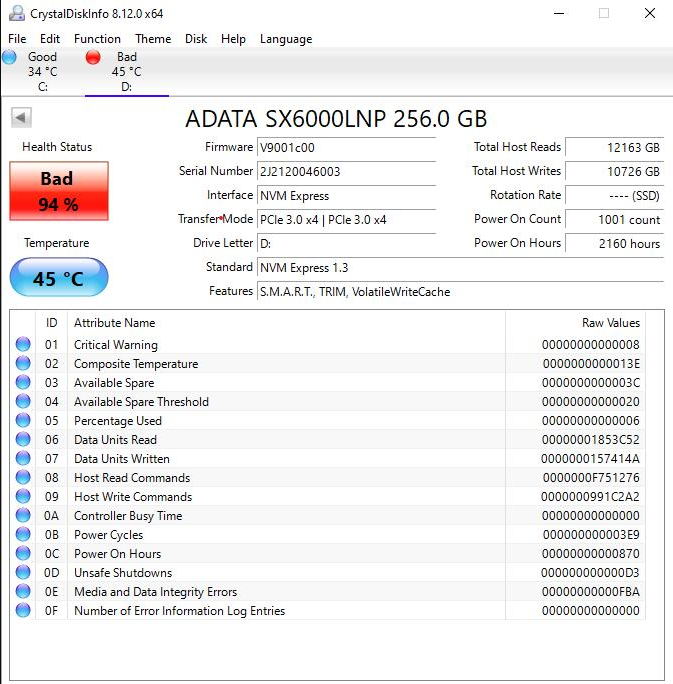
- Check the computer’s airflow.
- Inspect the SSD heatsink and thermal pad installation.
- Reduce sustained workloads if necessary.
- Monitor temperature under normal operating conditions.
If Percentage Used approaches or exceeds 100%:
- Check the drive’s rated endurance.
- Review its total host writes.
- Maintain regular backups.
- Consider replacement planning for critical applications.
If Media and Data Integrity Errors increase:
- Back up important files immediately.
- Monitor whether the error count continues to increase.
- Check the SSD’s firmware and system compatibility.
- Consider replacing the drive if errors persist or the drive reports critical warnings.
If the SSD becomes inaccessible or reports a critical warning:
Prioritize data recovery and backup rather than repeatedly testing the drive.
S.M.A.R.T. information is most useful when monitored over time. Changes in error counts, temperature, and endurance indicators can be more meaningful than a single reading.
7. Can S.M.A.R.T. Predict Every SSD Failure?
No. S.M.A.R.T. monitoring is useful, but it has limitations.
Some SSD failures happen without obvious warning signs.
Zum Beispiel:
- A controller may fail unexpectedly.
- Firmware problems may make a drive inaccessible.
- Electronic components may malfunction.
- Power-related issues may cause sudden drive failure.
- A drive may experience communication problems that are not reflected in its health percentage.
S.M.A.R.T. mainly reports the conditions and events that the drive is designed to monitor.
It cannot detect every possible hardware or software problem.
This is why regular backups remain essential, even when an SSD reports good health.
8. Why S.M.A.R.T. Monitoring Matters for SSD Reliability
S.M.A.R.T. monitoring is an important part of understanding SSD operating conditions.
For individual users, it helps track drive temperature, endurance, and potential warning signs.
For businesses and system integrators, it can also support storage maintenance and reliability management across multiple devices.
However, long-term SSD reliability depends on more than monitoring alone. NAND flash quality, controller design, firmware stability, manufacturing consistency, and compatibility testing all contribute to the final product.
For OEM and industrial storage applications, these factors are particularly important because storage devices may operate continuously under different workloads and environmental conditions.
A reliable SSD solution should combine appropriate component selection, firmware validation, quality control, and practical application testing.
Schlussfolgerung
S.M.A.R.T. monitoring provides valuable information about SSD health, temperature, endurance, and error conditions.
By regularly checking these indicators, users can identify potential problems earlier and make more informed decisions about maintenance and replacement.
However, S.M.A.R.T. should be treated as an early-warning and diagnostic tool, not a guarantee against failure.
The best approach is to combine regular health monitoring with reliable storage products and consistent data backups.
Looking for SSD solutions for different applications? Explore Oreton’s SSD products und OEM storage solutions for your project requirements.